Chrome Blog
The latest news from the Google Chrome team
Happy third birthday, Chrome!
Thursday, September 1, 2011
It’s that time of the year again for the Chrome team, when we pause on our anniversary to reflect on the amazing life and times of the web. It’s hard to believe that it’s already been
three years since we launched
our open source web browser, Chrome.
In that time, the web community has continued to inspire us, bringing the power of the web into all kinds of apps and experiences, with all modern browsers making great strides in speed, simplicity and security. To pay homage to the goodness of the web, we’ve put together an
interactive infographic
, built in HTML5, which details the evolution of major web technologies and browsers:
(With thanks to our friends at Hyperakt, Vizzuality, mgmt design, and GOOD)
In our third year, we’ve also brought Chrome's principles of speed, simplicity and security to a new model of computing: the
Chromebook
. The Chromebook is pure Chrome—a computer built for everything you ever need to do on the web while doing away with all the usual annoyances of an old, slow PC.
Here’s a quick fly-by through the some of the highlights of the past 12 months on the Chrome platform:
Faster and faster
We kick off the
Year of the Rabbit
with a new compilation infrastructure for the V8 JavaScript engine, codenamed “
Crankshaft
,” which improves JavaScript performance by up to 66 percent.
Chrome’s
new settings interface
helps you find the right settings quickly with an integrated search box. It also provides direct links to each settings page, which can be copied and pasted for easy troubleshooting.
The
omnibox
is improved to better suggest partial matches for webpage titles and URLs.
You can optionally enable
Chrome Instant
, which shows relevant content in the browser window as you type, before you press Enter.
Chrome’s built-in
prerendering technology
enables sites to build even faster experiences for their users—such as
Instant Pages
in Google search, which in some cases makes search results appear to
load almost instantly
.
Simpler and more accessible
Chrome supports many popular screen readers such as
JAWS
,
NVDA
and
VoiceOver
to help visually impaired people better experience the web.
Print Preview, a
popular feature request
, uses Chrome’s built-in
PDF viewer
to display the preview, and enables you to save any webpage as a convenient PDF file using the “
Print to PDF
” option.
Chrome’s icon takes on a
simpler look
to embody the Chrome spirit, since Chrome is all about making your web experience quicker, lighter and easier for all.
An even more secure platform
Our integrated and
sandboxed PDF viewer
enables you to view PDF files on the web without installing additional software. Furthermore, we built an additional layer of security around the PDF viewer called a “
sandbox
” to help protect you from security attacks that are targeted at PDF files.
Adobe Flash Player is
sandboxed on Windows
, further protecting you from security attacks and malware targeted at Flash content on the web.
Chrome warns you before downloading
some types of malicious files
with enhanced
Safe Browsing
technology. In order to help
protect privacy
, malicious content is detected without Chrome or Google ever having to know about the URLs that you visit or the files you download.
To provide greater transparency and control over the data that websites store on your computers, Chrome lets you delete
Local Shared Objects
created by Adobe Flash Player using the browser’s
built-in setting dialogs
.
Wowzah, the modern web!
The
Chrome Web Store
is an open marketplace where you can search for and discover web applications, both free and paid, along with ratings and reviews. Developers can add
in-app payments
to their apps for a flat 5 percent transaction fee.
Chrome supports
WebGL
, which brings
hardware-accelerated 3D graphics
to the browser with no additional software needed. For a taste of what WebGL can do, check out “
3 Dreams of Black
,” a 3D music experience for the web browser.
Chrome’s support for the
HTML speech input API
enables developers to give web apps the ability to transcribe your voice into text. Try it out on www.google.com by clicking on the microphone icon in the search box.
Hardware-accelerated
3D CSS
enables snazzier experiences in
webpages
and apps which use 3D effects.
Delivering a new, simpler model for computing
Chrome is
enterprise ready
, with an MSI installer and support for managed group policies. Many organizations such as Vanguard and Procter & Gamble have successfully deployed Chrome to thousands of users in an enterprise setting.
As of this past July, Chromebooks are now
available for purchase
in eight countries—the U.S., U.K., France, Germany, Italy, Spain, the Netherlands and South Korea. And just like Chrome, the Chromebook
always keeps getting better
. When you turn your Chromebook on, it updates itself automatically: you get the latest and greatest version of the operating system without having to think about it.
There’s more to come. Keep an eye on the
Chrome blog
to hear about new features and performance improvements as we continue to ship stable channel updates
every six weeks
. As always, on both Chrome and Chromebooks you’ll be automatically updated to the new versions as soon as they’re released.
Posted by Ben Goodger and Darin Fisher, Software Engineers
Be more productive with Gmail Offline in Chrome
Wednesday, August 31, 2011
Today’s world doesn’t slow down when you’re offline, so it’s a great feeling to be productive from anywhere, on any device, at any time. We recognize that offline access is important to many of you--especially for Chromebook users who spend most of their time
living on the web
. We talked about bringing this functionality to Google web apps at
Google I/O 2011
and today, the Google Apps team is releasing Gmail Offline.
Gmail Offline is a
Chrome Web Store app
that helps you read, respond to, organize and archive email when you don’t have an internet connection. Google Calendar and Google Docs offline will also be rolling out over the next week. To get started using Google Calendar or Google Docs offline, just click the gear icon at the top right corner of the web app and select the option for offline access.
Learn more on the
Gmail Blog
or check out the
Gmail Offline
app in the Chrome Web Store.
Posted by Alex Nicolaou, Engineering Manager
Back to school with Chromebooks for Education
Thursday, August 25, 2011
Summer may be winding down, but Chromebooks are heating up. Over on the
Google Enterprise Blog
today, we’re excited to share stories from the first three schools to hit the ground running with
Chromebooks for Education
. Chromebooks are fast, simple, and secure, and these benefits can be quite powerful in the classroom. Chromebooks increase time spent learning with a super-fast bootup, protect against viruses with
built-in security features
, and provide seamless access to all the great educational apps on the web. Plus, regular updates from Google mean that Chromebooks actually
get better over time
, saving thousands of dollars on maintenance and software upgrades.
We’re seeing tremendous interest from schools that we’re talking to about Chromebooks, and these
first three schools
all happen to be using Chromebooks in different ways. Grace Lutheran in Oshkosh, Wisconsin, is using Chromebooks in a shared classroom setting for fifth through eighth grades. The Fessenden School in West Newton, Massachusetts, will fill two traveling technology carts with Chromebooks, as well as allow students to check the devices out from the library. Merton Community School District in Merton, Wisconsin, will give one device to each student starting sixth grade this year, and the students will keep them through eighth grade.
Learn more about
Chromebooks for Education
on our website, or register to
join our webinar
on Tuesday, August 29 at 11:00 a.m. PDT.
Posted by Jaime Casap, Senior Education Evangelist, Chromebooks for Education
Find more while you browse with Google Related
Tuesday, August 16, 2011
Cross-posted from the
Inside Search blog
.
Almost every time I go online, I come across some new topic or item that I’d like to learn more about. Sometimes it’s as simple as the latest buzz on the new shop down the street. Other times it’s something more significant, like a counterpoint to an opinion piece I’m reading. While the answer can be just a simple search away, we wanted to find a way to get some of those answers to you even faster. Now with
Google Related
, a new
Chrome Extension
and
Google Toolbar
feature, you’ll automatically see interesting content relevant to what’s on the page you’re viewing, right where you’re viewing it.
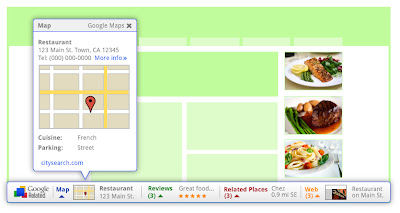
Whether you’re reading a news article, shopping for a new pair of shoes or visiting your favorite musician’s website, Google Related works in the background to find you the most interesting and relevant content on the topics you’re currently viewing. For example, if you visit a restaurant’s website, Related can show you a map, reviews from Google Places, mentions from across the web and other similar eateries that you might want to try.
Results will display in a thin bar at the bottom of your screen, and will remain minimized until you hover over them with your mouse. Once selected, they'll open up immediately in your browser window, saving you the trouble of having to open multiple new windows or tabs. If Google Related shows you something you’re interested in, you can let others know using the built-in +1 button.
In order to offer you relevant suggestions, Related sends the URL and other available information about the pages you visit back to Google. If you’re interested in how that data is used and stored, you can learn more
here
and
here
.
If you decide you’d rather not see the Related bar, you can easily hide it for specific pages and sites through the Options menu. If you use Related as part of Google Toolbar, you can disable Related entirely through the Options menu as well.
Google Related is available both as a Chrome Extension in the
Chrome Web Store
and as a new feature in Google Toolbar for Internet Explorer. Visit
www.google.com/related
to learn more and to get Google Related today.
Posted by Ran Ben-Yair, Product Manager, Google Related team, Israel R&D Center
Building better web apps with a new Chrome Beta
Thursday, August 11, 2011
Today’s new
Beta channel
release brings big improvements to Chrome’s web platform capabilities, enabling developers to build more powerful and more immersive apps and games for the web.
First, we’re pleased to announce the integration of
Native Client
into Chrome. Native Client allows C and C++ code to be seamlessly executed inside the browser with security restrictions similar to JavaScript. Native Client apps use
Pepper
, a set of interfaces that provide C and C++ bindings to the capabilities of HTML5. As a result, developers can now leverage their native code libraries and expertise to deliver portable, high performance web apps.
Another cool feature is the
Web Audio API
, a new JavaScript API offering advanced audio capabilities. The Web Audio API supports audio effects such as room simulation and spatialization, allowing web developers to create even more interactive experiences and games.
Here are some examples
you can play with, but we’re looking forward to seeing what other people build!
Update 8/14
: Native Client is currently only available for apps in the Chrome Web Store, but we plan to change this in the future. Keep an eye on the
Chromium blog
for updates.
Posted by Chris Rogers, Software Engineer
The computer that keeps getting better...
Wednesday, August 10, 2011
One of the things that excites us about
Chromebooks
is that unlike other computers, the user experience automatically gets better over time. For instance, with this week's latest stable release of Chrome OS, users may notice their Chromebooks now resume even more quickly – 32% faster in most cases. For those of you who like watching movies and TV shows on your Chromebook, you now also have the option to do so using
Netflix
. If you'd rather enjoy a good read, you’ll be able to fire up the Amazon’s new
Kindle Cloud Reader
app, read your favorite books and even take them offline when you’re not connected. If you need to print, you can give trees a break and use the
Print to Docs
feature with
Google Cloud Print
instead.
For businesses and schools, we also have a host of new features launching this week. If you use Citrix in your organization, you can now install the
Citrix Receiver Tech Preview
app from the Chrome Web Store to access desktop software such as Adobe® Photoshop® directly from your Chromebook. In addition, this latest release brings
VPN
and secure Wi-Fi support (802.1X).
Along with these new features, our recent update delivers many bug fixes and improvements under the hood. Chromebook users should automatically get this release this week. As a consumer, business or school, all you need to do is relax and let your Chromebook do the work. We hope you enjoy the experience of
a computer that keeps getting better
.
Update 8/10
: Added link to more information on Print to Docs feature
Update 8/11
: Updated link to new
Google Cloud Print
site
Posted by Alberto Martin, Technical Program Manager
Instant Pages on Google Chrome
Tuesday, August 2, 2011
A few weeks ago, we
announced
that Google’s
Instant Pages
feature would be available to our Chrome
beta channel
users. Today, we’re happy to let you know that Instant Pages is on by default in the latest
stable version
of Chrome. This means that sometimes when you click a Google search result in Chrome, the page will appear to load much faster than before. How much faster? In the video below, you can see a side by side comparison of Chrome with and without Instant Pages enabled.
We’re also really excited to announce that print preview is available for Windows and Linux users in the latest stable version of Chrome. (Hold tight Mac users, it’s coming!) Many people have been asking for print preview in Chrome for a long time, and we wanted to do it right, using our fast built-in
PDF viewer
and an easy “print to PDF” option. Thanks for your patience as we’ve plugged away on this feature.
In addition to adding new features to Chrome, we’re continually working to improve our old favorites. The
omnibox
, Chrome’s combination search box and address bar, has gotten much smarter in the latest release, making it even easier for you to get back to pages you’ve visited before. Just type part of the page's address or title and look in the dropdown for matching pages from your history. Enjoy!
Posted by Timo Burkard, Software Engineer
Labels
3d
53
accessibility
apps
chrome
Chrome Blog
chrome for a cause
chrome notebook
chrome os
chrome web store
chromebook
college basketball
cr-48
demo lab
demolab
extensions
Flash
google cloud print
googlenew
holidays
HTML5
instant
lab tech
mac
web apps
webgl
webrtc
Archive
2016
Sep
Aug
May
Apr
Mar
Jan
2015
Dec
Nov
Oct
Sep
Aug
Jun
May
Apr
Mar
Feb
Jan
2014
Dec
Nov
Oct
Sep
Aug
Jul
Jun
May
Apr
Mar
Feb
Jan
2013
Dec
Nov
Oct
Sep
Aug
Jul
Jun
May
Apr
Mar
Feb
Jan
2012
Dec
Nov
Oct
Sep
Aug
Jul
Jun
May
Apr
Mar
Feb
Jan
2011
Dec
Nov
Oct
Sep
Aug
Jul
Jun
May
Apr
Mar
Feb
Jan
2010
Dec
Nov
Oct
Sep
Aug
Jul
Jun
May
Apr
Mar
Feb
Jan
2009
Dec
Nov
Oct
Sep
Aug
Jul
Jun
May
Apr
Mar
Feed
Google
on
Follow @googlechrome
Follow
All things Google Chrome
Download Chrome
Download Chrome for Mobile
Chromium Blog
Chromium homepage




 Follow